? Fast Screen Recorder | Free Screen Recorder for Windows PC | FastPCTools
🌐 Try our Free Online Screen Recorder — No download needed!
Fast Screen Recorder Screen Recording Software

Fast Screen Recorder
record your computer/laptop screen

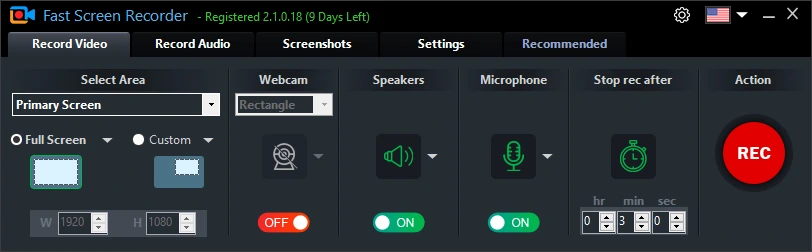
The easiest & best screen recorder for Windows. Record your full screen or custom area with system audio and microphone. Ideal for tutorials, meetings, online classes, and gaming highlights.

✅ Windows 11, 10, 8.1, & 8 ✅ Free Updates ✅ Safe Secure & Signed
Fast Screen Recorder
Fast Screen Recorder for
Windows 11, 10, 8.1, & 8
Fast Screen Recorder
Recording: 00:02:47
🎤 Mic: On🔊 System: On🖥 Full Screen
📸 Screenshot
⏱️ Auto-Stop
⌨️ Hotkeys

Capture Your Screen Like a Pro — Fast & Secure

🖥️

Full Screen or Custom Area

Choose to record your entire screen, multiple screens, or a custom rectangular region. With or without taskbar.

🎤

Mic & System Audio

Record microphone voice, system audio (what you hear), both together, or record video with no sound.

⏱️

Auto-Stop Timer

Set a recording duration timer. The tool automatically stops when time is up — ideal for long scheduled recordings.

📸

Screenshot at Any Time

Capture instant screenshots during or outside of a recording session with a single key press.

⌨️

Hotkey Controls

Fully customizable keyboard shortcuts to start, pause, resume, and stop recording — stay in flow.

🎮

Gameplay & Streaming

Record gaming sessions, walkthroughs, and highlight reels with optimized capture modes.

🎓

Online Class Recording

Record online classes, meetings, and webinars directly on your PC with audio.

💾

Save & Convert Easily

Record in MKV, then convert to MP4, MOV, AVI, WMV, or MP3. Ready for YouTube, Google Drive, or any video player.

Start Recording in 3 Easy Steps

1

Download & Install

Download the free installer (~5 MB). Installation completes in under 30 seconds.

2

Choose Your Area

Select multiple screens, full screen, or a custom recording area.

3

Press Record

Hit the REC button. Stop anytime — your video is instantly saved and ready.

Fast Screen Recorder

Download Fast Screen Recorder

Windows 11, 10, 8.1, & 8·~5 MB·Free download

⬇ Free Download for Windows
💎 Get Full Version – Remove Limitations →
✅ 100% Safe✅ No Malware✅ Digitally Signed

Frequently Asked Questions

Yes. Open Fast Screen Recorder, select full screen or meeting application area, and press REC. Your meeting will be saved directly to your PC.
Yes. You can record microphone audio, system audio (what plays through your speakers), both simultaneously, or no audio — your choice.
The trial version is completely free to download and use. A paid license unlocks the full feature.
Recordings are saved as MKV and convert in AVI or MP4 files, compatible with all major video players and social media platforms.
Yes. Fast Screen Recorder works with any on-screen content including games. Select the game window area or full-screen mode, and start recording.
Yes! Try our Free Online Screen Recorder — no download needed, works directly in your browser. Maximum 2-minute recording in the free online version.