Download & Convert Videos INSTANTLY!

Best Application as Reviewed by Softpedia.com

  • Download for PC
  • Buy Now

Key Features:

  • Download video from 1000+ sites
  • Search video for download
  • Download Full HD & Live Streams
  • Record Your Computer Screen
  • Set Schedule for download video
  • No limit for multiple download
  • Convert video resolution
  • Convert video format
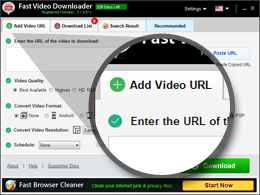
  • Step 1

    Add Video URL to download

    step one
  • Step 2

    Select settings to download & convert
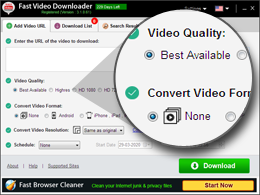
    step two
  • Step 3

    Download All Videos in One Click
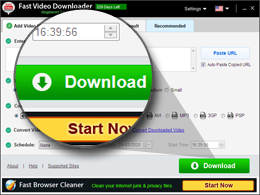
    step three
Fast Video Downloader Reviews
  • “Yea i really appreciate because it is fast and wonderful and it require all the videos i need thanks to you all and please keep the good work.”

    -Sarjo Baldeh (softonic.com)

  • “A lightweight and straightforward application that allows you to download your favorite videos from several online hosting websites.”

    -Andrei Fercalo (softpedia.com)

  • “ I Love this - This Software have so many great features. I love this fast video downloader.”

    - Lucey2018 (uptodown.com)

  • Download for PC

    Compatible with: 10, 8, 8.1 & 7 (64 or 32 bit)

  • Buy Now

    Purchase now with 30 days money back guarantee.

Frequently Asked Questions

+ How to search Youtube videos for download?

Select tab "Search Result". In "Search Result" tab click on input box and type the text related to video which you want to search on Youtube. Now click on search button to search videos. After search is complete it will display result in area below input box. Click on Download button to start download.You can view the progress of video download in "Download list".

+ How to download videos?

There are 2 ways to download video. First is to search for the video in browser using your favourite search engine. Copy the url of the video and then paste in the input box of Fast Video Downloader's first tab "Add Video URL" and Click on big green button "Download" to start download. Second is to click on "Search Result" tab of Fast Video Downloader. Here type the text related to video in input box which you want to search on Youtube. Now click on search button to search videos.Click on Download button to start download.You can view the progress of video download in "Download list".

+ Is Fast Video Downloader compatible with Windows?

Yes, this app is compatible with Windows. It is one of the best video downloader and converter for Windows.

+ How to convert downloaded video?

You can also convert videos which are available on your computer along with downloaded videos. Click on settings and select "Convert Downloaded Video" option. On the new screen which opens you can add videos which you want to convert. Select the output format for the videos and click on "Convert Video" button to convert video.

+ Is it possible to download videos in free version of Fast Video Downloader?

Yes, You can download videos from youtube in free version. You can download 5 videos simultaneously in free version. Download fast video downloader and enjoy!.

Awards

Terms of Use    |    Privacy Policy    |    EULA    |    Uninstall Guidelines

Copyright © 2026 FastPCTools., All rights reserved.
instructions

instructions